Posts

Showing posts with the label SCCM

SCCM log location during task sequence

You can find the log of the task sequence on the following locations (is depending of the progress of the the task sequence): Before hard drive is formatted and partitioned X:\Windows\Temp\smstslog\smsts.log After hard drive formatted X:\smstslog\smsts.log and then copied to C:\_SMSTaskSequence\Logs\Smstslog\smsts.log Before SCCM agent installed C:\_SMSTaskSequence\Logs\Smstslog\smsts.log After SCCM agent installed %SystemRoot%\CCM\Logs\Smstslog\smsts.log After the task sequence is complete %SystemRoot%\CCM\Logs\smsts.log Good luck with the task sequence! ;-)
ConfigMgr 2007 - Policy and ci_sdmpackages table large and growing fast

How to eliminate slack space in the Microsoft ConfigMgr 2007 database? I have a customer with a big Microsoft Configuration Manager 2007 database (more than 25 GB). The table Policy and the ci_sdmpackages table were unusually large. I found that the disk space consumption comes from a FEP 2010 bug... I can fix this issue with the following SQL-Commands. Please make a backup of your database before you start with the execution of the commands and look for enough disk space (minimum double of database size)! Good luck! First SQL command: DELETE FROM Policy WHERE PolicyID NOT IN (SELECT PolicyID FROM PolicyAssignment WHERE PADBID IN (SELECT PADBID FROM ResPolicyMap)) AND PolicyID NOT IN (SELECT ModelName FROM CI_ConfigurationItems) AND PolicyID LIKE '%SUM_%' Second SQL command: dbcc cleantable ('(Your DB Name)','ci_sdmpackages') GO alter index CI_SDMPackages_AK on ci_sdmpackages reorganize with (lob_compaction=ON) GO alter index CI_SDMPackages_AK2 ...

SCCM 2012 Software Center returned error code 0x0041013 (-2147217389)

After an update from SCCM 2007 client to SCCM 2012 client, there is sometimes show the error "Loading Software Center returned error code 0x80041013 (-2147217389)." in Software Center. This even though the client was successfully installed. I think this error is because not all parts of the old SCCM clients have been properly removed. You can fix this issue with the following steps: Open registry Go to  HKEY_CLASSES_ROOT\CLSID\{555B0C3E-41BB-4B8A-A8AE-8A9BEE761BDF}\InProcServer32 Check the value for Default is C:\WINDOWS\CCM\ccmcisdk.dll (if not, change the value) Go to  HKEY_CLASSES_ROOT\Wow6432Node\CLSID\{555B0C3E-41BB-4B8A-A8AE-8A9BEE761BDF}\InProcServer32 Delete the value in Default (value is C:\Windows\SysWOW64\CCM\dcmsdk.dll) You can launch the software center again and you can see the applications without the error message.

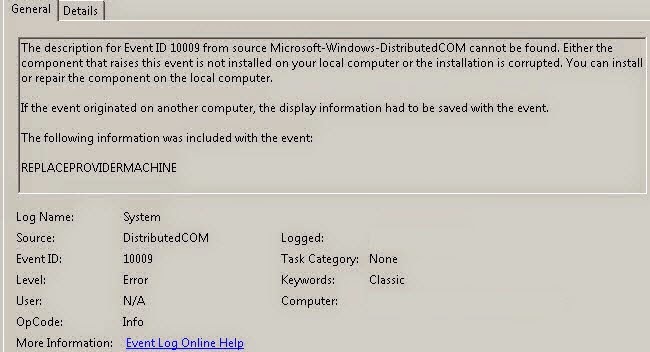
SCCM Console - EventID 10009 REPLACEPROVIDERMACHINE

Image
I have the following message in the event log and i can't start the Microsoft System Center Configuration Manager Console 2007. I'm fix the error with this steps: Running wbemtest.exe with admin rights Click Connect, type \\siteserver\root\sms  and then click Login Click Enum Classes, click Recursive and then click OK. In the Query Result list, double-click SMS_ProviderLocation Click Instances and then double-click the line that contains the target site code For example, SMS_ProviderLocation.SiteCode="xxx" In the Properties section, locate the NamespacePath line. You may have to double-click this line to see the whole line. Copy the NamespacePath value to the clipboard. For example, copy the following value: \\server_name\root\sms\site_xxx You can find more information at this link -> https://support2.microsoft.com/kb/317872/en-us

Unlocking Microsoft SCCM 2012 R2 Objects

When you will edit a Task Sequenz or other entries in Microsoft System Center Configuration Manager 2012 R2 and the message "Cannot edit the object, which is in use by 'username' at Site 'configmgr site'." pop up, you can fix this with the following steps. Open Microsoft SQL Server with the SCCM  instance Make a SQL Query with the following statement select * from SEDO_LockState where LockStateID <> 0 Copy the LockID from the entrie you will unlock Make a second SQL query with the following statement DELETE from SEDO_LockState where LockID = '< copied  LockID from the previous query>' After this steps you can edit the locked entries again in the SCCM console.