Posts

Showing posts with the label Lync

Skype for Business iOS Client sign in issue

I had the problem that users of iOS devices couldn't log in to the Skype for Business Client on their devices. The reason of the problem was very simple. iOS clients doesn't support the basic NTLM authentication method. Resolution Check the web service configuration from the Skype for Business Server with the following steps: Start the Skype for Business Management Shell and view the web service settings with the command " Get-CsWebServiceConfiguation " Change the settings with the command " Set-CsWebServiceConfiguration -UseWindowsAuth Negotiate " (Default setting is NTLM) Check the new configuration with the command from Step 1 Now the iOS users can sign in again to Skype for Business Client. Good luck!

Cannot complete call transfer in Lync Server 2013

Image
I'm implementing a new Microsoft Lync 2013 deployment in my company. I had a standard Lync call forwarding problem at the same SIP trunk deployment was used in the old Lync 2010 deployment. The problem was that I could not forward any calls to my mobile phone or other phones. The Lync client show the message "Cannot complete the transfer." Only from Lync Client to Lync Client works perfectly. I looked at the old environment and found the solution to the problem. I had the same problem already and the last time I had solved it (but unfortunately not documented ... but now it's documented :-) ). The fix was very simple. You must make the following changes in your environment. Open the Lync 2013 Powershell (with admin rights) Get-CsTrunkConfiguration If the setting of EnableReferSupport already has the value FALSE, then you have another problem that can not solved with my instructions! Backup the config Set-CsTrunkConfiguration -EnableReferSupport $F...

Lync 2013 - Cannot find any suitable disk for database files

Image
When you install a Microsoft Lync 2013 Server and you become the following message in Step 2 "Setup or Remove Lync Server Components"... Error: An error occurred: "Microsoft.Rtc.Management.Deployment.DeploymentException" "Cannot find any suitable disks for database files. You must manually specify database paths." ... is the solution very simple. Expand your system drive space or clean it. The cause of this error was lack of free disk space on the C:\ drive. You still need 16 GB of free disk space on the system drive.
Image
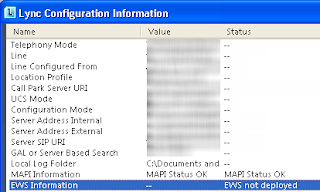
Lync - EWS not deployed on Configuration Tab Lync was not able to find EWS, althoght Outlook and Exchange autodiscovery seems to be ok. You will see EWS not deployed in Lync 2010 client configuratiob tab. You can using this with Ctrl+Right click  on Lync sign on the taskbar. The problem can fixed by modifying the Autodiscover-Webconfig (you find the web.config under %ProgramFiles%\Microsoft\Exchange Server\V14\ClientAccess\Autodiscover\web.config). Open the Config-File with notepad.exe and adding the following line under <handlers>... <add name="AutodiscoverSVCHandler" path="*.svc" verb="POST" type="System.ServiceModel.Activation.HttpHandler, System.ServiceModel, Version=3.0.0.0, Culture=neutral, PublicKeyToken=b77a5c561934e089" preCondition="integratedMode,runtimeVersionv2.0" /> You can see the full config in the following PrintScrn... Restart the Lync-Client and reopen the configuration tab. You c...